What Are the Different Website Platforms to Build On?
If you are planning a new website, the main website platforms to choose from are WordPress, drag-and-drop builders like Wix and Squarespace, Shopify for online shops, Webflow for design-led sites, and modern code frameworks like Next.js hosted on platforms such as Vercel. Each one makes a different trade between how easy it is for you to edit, how fast it runs, and how far it can be pushed as your business grows.
There is no single best answer, and anyone who tells you otherwise is usually selling the platform they happen to build on. We are Seonat, a UK agency, and we build client sites on a conjunction of WordPress and Vercel, choosing between them (and sometimes combining them) depending on what each client actually needs. This guide walks through the main options honestly, including where each one falls down.
The platform question is really three questions. Who will edit the site? What does it need to do? And how fast does it need to be?
The main website platforms compared
Here is the landscape as we see it after three years of building, rebuilding and rescuing business websites.
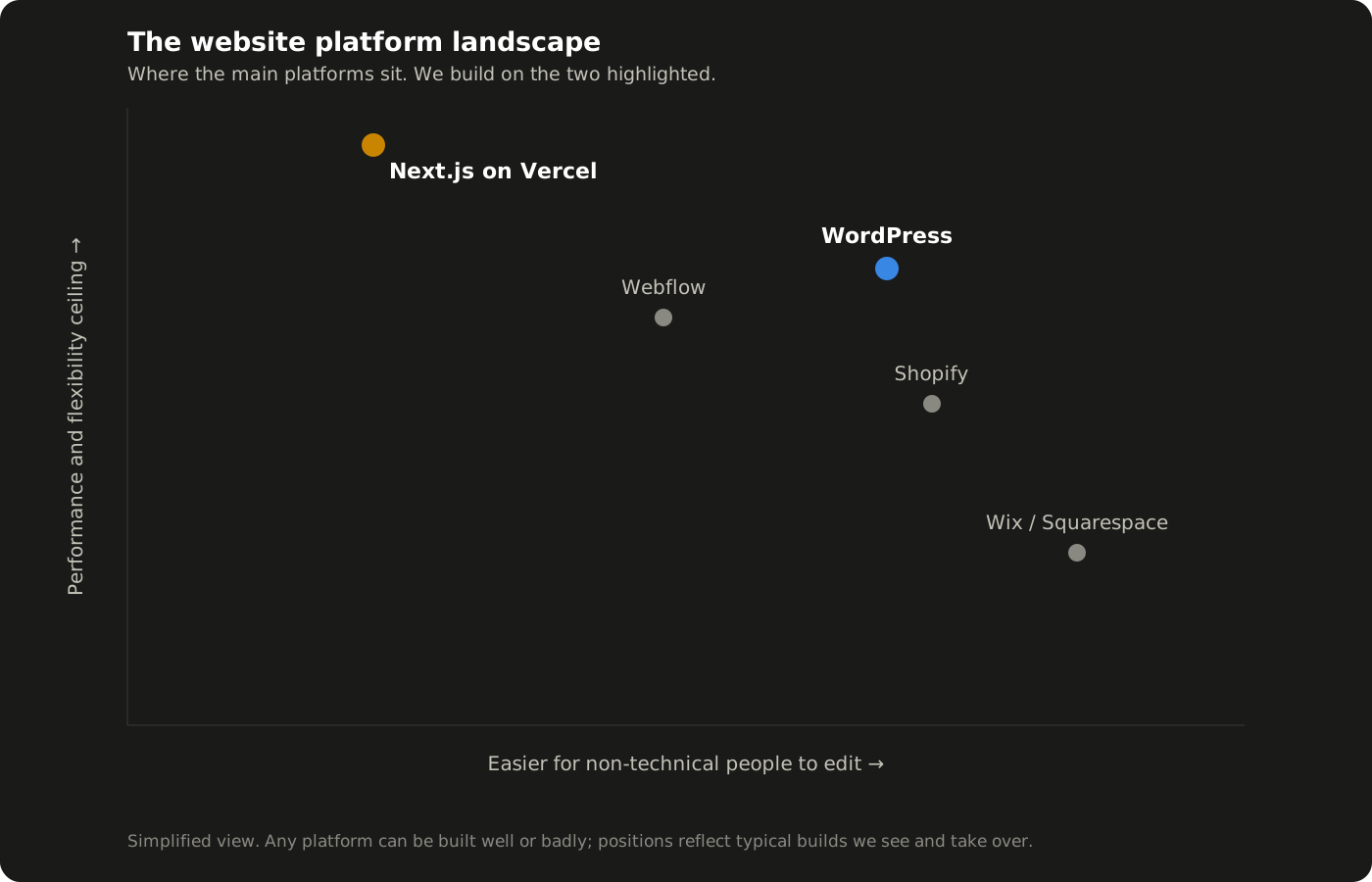
WordPress powers over 40 percent of the web, and for good reason. It is open source and free (see wordpress.org), endlessly extendable through plugins, and most people can learn to edit a page or publish a blog post in an afternoon. The catch is that this freedom cuts both ways: a WordPress site loaded with cheap plugins and a heavy theme becomes slow and fragile. Most of the sites we are asked to rescue are WordPress sites that grew without discipline.
Wix and Squarespace are the easiest way for a non-technical person to get something presentable online quickly. For a hobby site or a brand-new business testing an idea, they are genuinely fine. The ceiling arrives fast though: limited technical control, template-bound design, and you can never take the site with you, because you are renting the platform, not owning the build.
Shopify is the default for e-commerce, and deservedly so. Checkout, stock, payments and tax are solved problems. For a business that is primarily a shop, it is usually the right call. For a business where the shop is secondary to content and lead generation, it can feel like living in a warehouse.
Webflow sits between builders and code, giving designers fine visual control with cleaner output than most WordPress themes. We rate it, but its pricing grows with your ambitions, and finding people who can maintain a Webflow build is harder than finding WordPress or JavaScript developers.
Next.js on Vercel is the modern developer route: the site is written as code and served through Vercel's global edge network. There is no admin dashboard bloat, no plugin roulette, and pages load about as fast as physics allows. The trade-off is honest and unavoidable: you need a developer to build and change it. This very site runs on Next.js and Vercel, so you are reading the evidence.
What we build on, and why
We deliberately work across two platforms rather than one. Most of the twelve client builds in our portfolio, from golf simulator installers to roofing firms, run on WordPress, because those clients edit their own content, and handing a tradesperson a code repository helps nobody. Others, and our own site, run on Next.js and Vercel, because when a site's job is converting expensive traffic, speed is money.
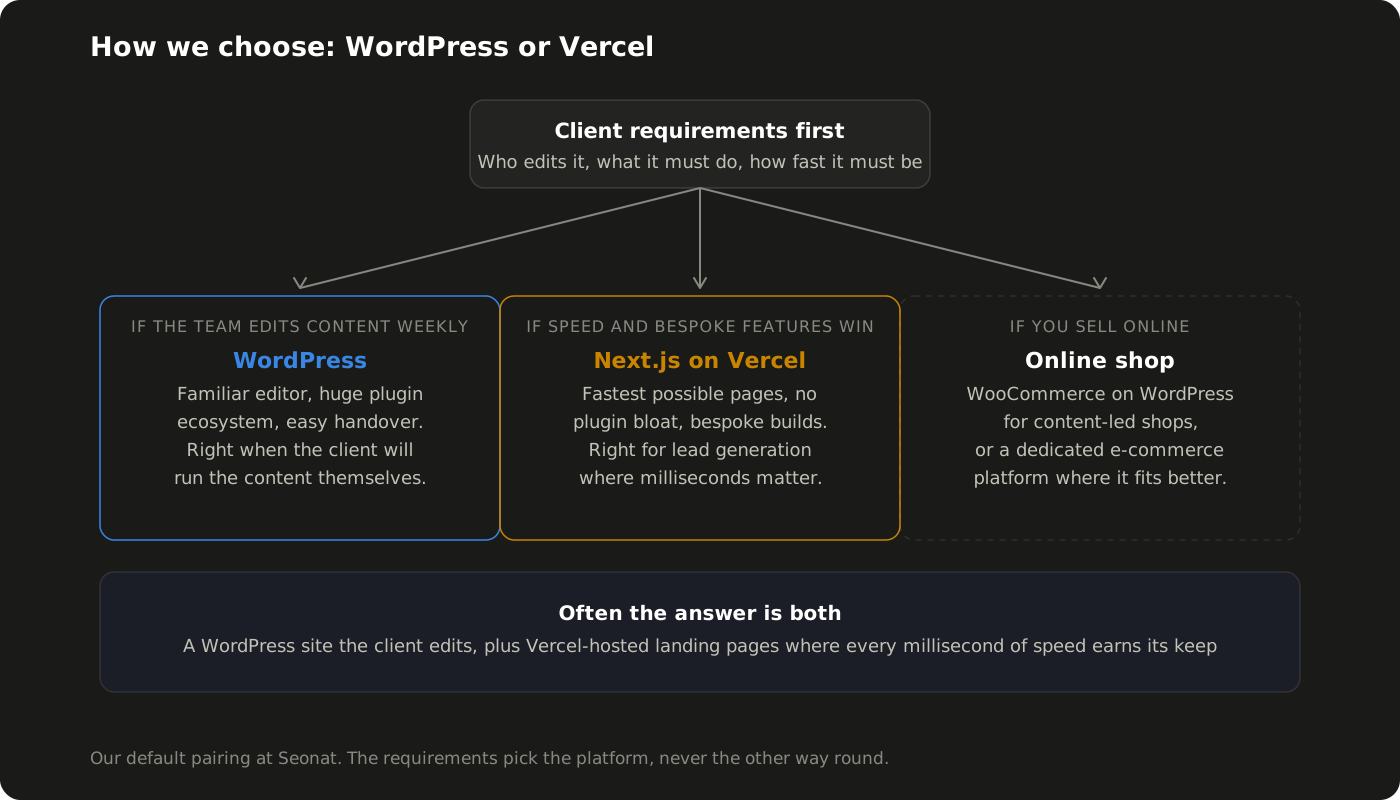
In our experience, WordPress works better than drag-and-drop builders like Wix for any business that plans to invest in SEO, because it gives you full control of the technical details that rankings are built on: page structure, speed optimisation, schema, redirects and clean URLs. On builder platforms you inherit whatever the template decided. But we will also say plainly that WordPress is not the answer to everything: we moved our own website from WordPress to Next.js on Vercel precisely because we wanted page speeds that no plugin stack could match, and we route clients the same way when their requirements point there.
We build on WordPress when the client runs the content, and on Vercel when speed and bespoke functionality win the work. The requirements pick the platform, never the other way round.
From working with clients across trades, healthcare and e-commerce, we have found the pairing covers almost every real-world case. A carpentry firm that posts project photos monthly gets WordPress and edits it happily. A business spending serious money on ads gets Vercel-fast landing pages, because as we covered in our guide to what PPC means, sending paid clicks to a slow page is the quickest way to waste a budget. Sometimes one client gets both: a WordPress site their team runs, plus a handful of Vercel-hosted campaign pages doing the heavy lifting.
Why your platform choice matters for SEO
Google does not rank platforms, it ranks pages, but the platform decides how hard good rankings are to earn. Site speed, mobile experience and crawlability are all baked into how a site is built, and they are core ingredients of SEO, as we explained in What is SEO?. A slow, bloated build starts every race with a weight vest on.
This is also the argument against choosing purely on ease. The £15-a-month builder site is not cheap if it quietly costs you the search traffic a well-built site would have earned. We have taken over sites where simply rebuilding the same content on a faster foundation moved rankings within weeks, with no new content at all.
A website platform is a foundation, not a feature. You feel a bad choice for years, usually in the search results.
How to choose for your business
Strip away the branding and the choice usually resolves in a few questions.
Who updates the site, and how often? If your team publishes weekly, pick something they will actually use. An unused CMS is an expensive way to feel guilty.
What must the site do? Brochure and lead generation, publishing, or e-commerce all pull towards different platforms.
How much does speed matter? If you buy traffic or fight for competitive rankings, performance is a revenue lever, not a technical nicety.
What happens in three years? Can you export your content, change agency, or extend the site? Owning a WordPress build or a code repository travels with you. A builder subscription does not.
If you are still unsure, that is normal, and it is exactly the conversation we have at the start of every website design project. We will tell you which platform fits your requirements and budget, including when the answer is the cheaper option. Get in touch and we will talk it through with no obligation, even if you just want a second opinion on a quote you have already had.